Users Tuesday Tip : Adding more Global HTML

Post new topic   Reply to topic

View previous topic View next topic Go down

20100302

Post 

Users Tuesday Tip : Adding more Global HTML


Users Tuesday Tip : Adding more Global HTML


Hello!

New concept for our Tuesday tips : now we will be adding tips made by you, our users!

Let's start with this interesting tip, by Justaguy.

justaguy wrote:Well once you start editing your forums and adding lots of new stuff like custom cursor and other cool gadgets and widgets you realise youve run out of space in the website description of the forum!
Well if you read this topic you will find out how to change that!

1. Login to the ACP (Admin control Panel)

2. Go to General Tab


3. Scroll down to Messages and Emails tab->Announcements


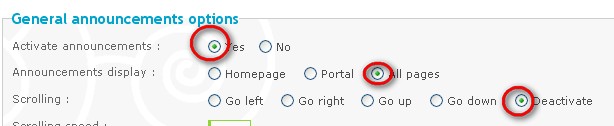
4. Edit the settings!
YOU MUST SET THE FOLLOWING SETTINGS AS SAME AS THE PIC!->

5. Adding Messages and Global HTML's
Scroll Down And click on the Green PLUS as it is on the image!


Only one message can be added.
If you add more than 1 the others wouldnt be displayed and the html in them wouldnt work.

Adding the Message->


As name you can put whatever you want.
In the content you place your global messages and global HTML scripts

Place scrolling text in

Code:
<marquee>your scrolling text here</marquee>

After the Marquee code you can Place all your html's
My Content of the website there is ->

Code:
<marquee>Welcome to our forums!-><b>BE ACTIVE AND RESPECT OTHERS!</b></marquee><style type=text/css>body, a, a:hover {cursor: url(http://sites.google.com/site/rubycocoamemo/_/rsrc/1233131355774/Home/table-view/doragguandodoroppu/copyCursor.png), progress;}</style>
<script language=Javascript1.2> function ejs_nodroit() { alert('FOR IMAGE CONTACT OWNERS!'); return(false); } document.oncontextmenu = ejs_nodroit; </script>

Usually this would be too big to get in
General->Forum->Configuration->Site description
But now i have all those working Smile
ENJOY!


Thanks Justaguy!

Want to have your tip featured ? PM me!

Best,
Forumotion Team

Typlo
Administrator
Administrator

Male
Posts: 2991
Age: 24
Language: French, English
Country:
Join date: 2007-09-04

Back to top Go down

Share this post on: Excite BookmarksDiggRedditDel.icio.usGoogleLiveSlashdotNetscapeTechnoratiStumbleUponNewsvineFurlYahooSmarking

Users Tuesday Tip : Adding more Global HTML :: Comments

Post on 2nd March 2010, 14:37 by Russel

thanks typlo. more power XD

Back to top Go down

Post on 2nd March 2010, 15:17 by Monk1

Thank you typlo, this is just what I need Very Happy

Back to top Go down

Post on 2nd March 2010, 20:52 by Donal

Thanks typlo and Justaguy! :wouhou:

Back to top Go down

Post on 3rd March 2010, 13:03 by Estee

What does this do exactly? Can you put a link to demonstrate? Thank you

Back to top Go down

Post on 3rd March 2010, 17:10 by vichul

Estee wrote:What does this do exactly? Can you put a link to demonstrate? Thank you


It adds an announcement on the top of your page (below your header)

Back to top Go down

Post on 4th March 2010, 00:51 by KingOfSports

Can I have a link to a forum that has this activated?

Back to top Go down

Post on 4th March 2010, 01:31 by MrMario

This is what it looks like. http://tesingroom.darkbb.com/index.htm You can also change the text when right clicking and also change the url of the mouse.

Back to top Go down

Post on 5th March 2010, 02:41 by christmaslover

Thank you soo much I used this same script </marquee> for my blinkies so they too scroll, now by chance would any know if you can speed up or slow down the marquee?
again thank you,
smiles
christy
Ü

Back to top Go down

Post on 5th March 2010, 03:18 by guimaras

Thank you!!!

Back to top Go down

Post on 5th March 2010, 04:51 by mozaski

Or you guys could do something like this.

Back to top Go down

Post on 7th March 2010, 18:41 by Kyouri

Peachy! Thanks, now I can still have the wibiya bar and play around with other stuff.

Back to top Go down

Post on 12th March 2010, 20:44 by paijo

thanks Typlo

Back to top Go down

Post on 13th March 2010, 20:53 by KMX

Very cool.Thank you!

Back to top Go down

Post on 24th March 2010, 07:03 by javiert30

You can do this easier going to ACP/Genereal/Messages & Emails/Announcements activate it (yes) and do your settings. You are done.

I did it like that... http://soloenpuertorico.forumotion.com/index.htm

Back to top Go down

Post on 27th March 2010, 05:59 by ghdivstyle

CONTENT REMOVED ~~MEMBER BANNED ~~MRMARIO

Back to top Go down

Post on 10th April 2010, 09:31 by lichassassin

Is it possible to get another cursor when mouse-overing a link?

Back to top Go down

Post on 10th April 2010, 21:18 by justaguy

Yes it is.
All you need is to find your desired image link and to replace it in the code.
And the main purpose of tutorial is not to have the announcements thing activated its purpose is to add more html codes which will work on every single page on the forum.

Back to top Go down

Post on 11th April 2010, 10:34 by ka5an

I can not slow down "Scrolling speed" on my forum [url=http://beogradskaka5anija.cyberfreeforum.com/index.htm]Beogradska ka5anija[url/].It's always the same speed.

Back to top Go down

Post on 11th April 2010, 10:40 by ka5an

(Sorry I posted this link to my forum) Confused

Back to top Go down

Post on 17th April 2010, 00:24 by jomblo_karat

thank bos
héhé

Back to top Go down

Post on 17th April 2010, 07:44 by The God

Thank you :wouhou:

Back to top Go down

Post on 24th April 2010, 11:33 by Farhan Honey

Back to top Go down

View previous topic View next topic Back to top


Permissions of this forum:
You cannot reply to topics in this forum