
 Home
HomeCategories and Forums - Creation and Appearance
Page 1 of 1

 Categories and Forums - Creation and Appearance
 by Caihlem March 24th 2007, 2:44 pm
| Categories and Forums - Creation and Appearance |
Please take care to read the full tutorial. - CREATE A CATEGORY - CREATE A FORUM - CREATE A SUB-FORUM - TABLE CATEGORY :: FORUM :: SUB-FORUM - CHANGING THE DISPLAY OF YOUR BOARD - HOW TO DELETE THEM |

Caihlem- Energetic
-
 Posts : 8969
Reputation : 342
Language : English, French & Female
Location : You can't fly like the phenix
SarkZKalie and Magmax like this post

Re: Categories and Forums - Creation and Appearance
by Caihlem March 24th 2007, 2:45 pm
| Creating a Category |
Creating a Category  Important: Once your category has been created, it must have at least one forum inside to appear on your board. Otherwise it will only be displayed in the admin panel, but not on your forum! Important: Once your category has been created, it must have at least one forum inside to appear on your board. Otherwise it will only be displayed in the admin panel, but not on your forum! Administration Panel => General => Categories and forums  Right from your board's title, click on the + icon (Add a link)   Choose the kind of forum you want > choose Category Category Name: Write the title your category will have Description (optional): You can add a descripton of your Category. Choose the kind of forum you want > choose Category Category Name: Write the title your category will have Description (optional): You can add a descripton of your Category.Take notice that this description will not appear for a normal category, but will appear on a Category attached to another Attached to: Leave the name of your board in this list Position this forum after: Select here the positon your Category will have when displayed on your board in correlation with previous existing Categories or forums. Finally, click on Save |
| This tutorial was written by the Forumotion Team. |
Caihlem- Energetic
- Posts : 8969
Reputation : 342
Language : English, French & Female
Location : You can't fly like the phenix
Re: Categories and Forums - Creation and Appearance
by Caihlem March 24th 2007, 2:45 pm
| Creating a Forum |
Creating a Forum  Administration Panel => General => Categories and forums  Right from the title of your category, click on the + icon (Add a link)  Choose the kind of forum you want > choose Forum Forum Name: Write the title your forum will have Description (optional): You can add a descripton of your Forum. Attached to: leave the name of your category Position this forum after: Select here the positon your Forum will have when displayed on your board in correlation with previous existing forums. Choose the kind of forum you want > choose Forum Forum Name: Write the title your forum will have Description (optional): You can add a descripton of your Forum. Attached to: leave the name of your category Position this forum after: Select here the positon your Forum will have when displayed on your board in correlation with previous existing forums. Finally, click on Save Notice: You also have access to the Autopruning and Permissions settings here, which will be dealt within the appropriate tutorials  |
| This tutorial was written by the Forumotion Team. |
Caihlem- Energetic
- Posts : 8969
Reputation : 342
Language : English, French & Female
Location : You can't fly like the phenix
Re: Categories and Forums - Creation and Appearance
by Caihlem March 24th 2007, 2:45 pm
| Creating a Sub-Forum |
Creating a Sub-Forum  Administration Panel => General => Categories & Forums  Right from the title of a forum, click on the + icon (Add a link) 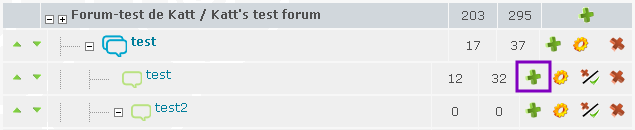 Choose the kind of forum you want > choose Forum Choose the kind of forum you want > choose ForumNote: A sub-forum is merely a forum within a forum Forum Name: Write the title your forum will have Description (optional): You can add a descripton of your Forum. Attached to: leave the name of the forum Position this forum after: Select here the positon your Forum will have when displayed on your board in correlation with previous existing forums. Finally, click on Save Note: You also have access to the Autopruning and Permissions settings here, which will be dealt within the appropriate tutorials |
| This tutorial was written by the Forumotion Team. |
Caihlem- Energetic
- Posts : 8969
Reputation : 342
Language : English, French & Female
Location : You can't fly like the phenix
Re: Categories and Forums - Creation and Appearance
by Caihlem March 24th 2007, 2:46 pm
| Table Category :: Forum :: Sub-Forum |
Table Category :: Forum :: Sub-Forum  1.: This line represents your board 2.: This line represents a category 3.: This line represents a forum 4.: This line represents a sub-forum |
| This tutorial was written by the Forumotion Team. |
Caihlem- Energetic
- Posts : 8969
Reputation : 342
Language : English, French & Female
Location : You can't fly like the phenix
Magmax likes this post
Re: Categories and Forums - Creation and Appearance
by Caihlem March 24th 2007, 2:46 pm
| Changing the Display of your Board |
Changing the Display of your Board It is possible to display your Categories, Forums and Sub-forums in different ways. Administration Panel >> Display >> Homepage >> Structure & Hierarchy  Index Packing - None: 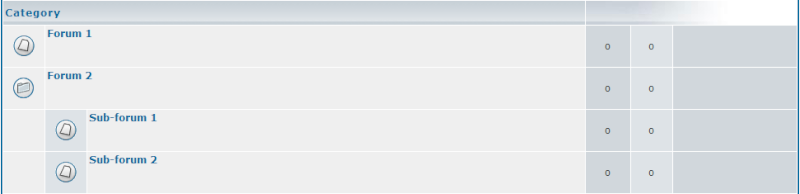 - Medium:  - Full:  -------------------------- Split categories on index :: Splits the categories into different tables. 1 category per table 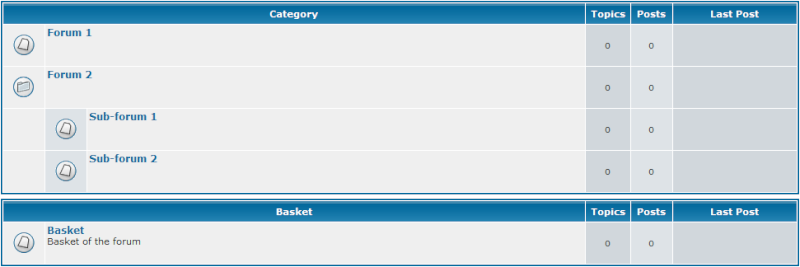 -------------------------- Sub-level links on index :: - No  - Yes  - With Icons  --------------------------- Display viewonline information box on index ::  Never: It will not be displayed On root index only: It will be displayed only on your index page Always: It will be displayed on your index page as well as in your Categories Never: It will not be displayed On root index only: It will be displayed only on your index page Always: It will be displayed on your index page as well as in your Categories |
| This tutorial was written by the Forumotion Team. |
Caihlem- Energetic
- Posts : 8969
Reputation : 342
Language : English, French & Female
Location : You can't fly like the phenix
poesia-verses likes this post
Similar topics» categories/forum creation
» Can i set a value of post for Categories and forums so members are under that value can not go to the Categories and forum?
» Categories and forums created, but categories not showing...
» Categories and forums 4 in 1
» forums and categories
» Can i set a value of post for Categories and forums so members are under that value can not go to the Categories and forum?
» Categories and forums created, but categories not showing...
» Categories and forums 4 in 1
» forums and categories
Page 1 of 1
Permissions in this forum:
You cannot reply to topics in this forum Facebook
 Twitter
 Pinterest
 Youtube
