
 Home
HomePrivate Messages
Page 1 of 1

 Private Messages
 by The Godfather November 5th 2007, 11:52 am
| Private Messages |
The role of the 4 boxes  Inbox: This is where you find the messages the members sent you. When the maximum storage is reached, the oldest one will be dropped automatically. You have the option to either save a message or to delete it. Sentbox: This contains the messages that you sent to another member and that the recipient has read already. Outbox: This contains all PMs that you have sent already, but that have not been read yet. A message in the Outbox is already sent, it just waits to be read by the recipient. Once read, the message goes to the Sentbox. So you can exactly say, which messages have been noted already and which haven't. Savebox: The box where important messages can be saved. For that, select a message in any other box by ticking the checkbox and click on "Save Selected". Those PMs will be moved here if you have space left. Enable/Disable PMs in our forum For the ones who don't want their members to send private messages to each other, go to Admin Panel > General > Forum > Messages & Email 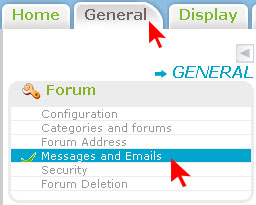 Private Messaging > Tick Enabled or Disabled  Set the capacity of the Inbox and the other boxes It is possible to restrain the number of PM's, that members can keep in their PM boxes. Go to Admin Panel > General > Forum > Messages & Email Set the capacity of the four boxes.  The maximum capacity is 200 PMs per box, this cannot be increased. Can I disable the PM function of a single member? Of course! It might occur that a member abuses the PM function: advertising, spamming, even harassment. In this case, to care for your members, it's better to prevent him/her from causing trouble. To disallow them to use PMs, follow the instructions below. However, it is possible that the member gets mad and begins to flood directly on the forum. In this case, it is possible to even ban them. Go to Admin Panel >> Users & Groups >> Search Users Click on the troublesome member to open his profile. At the bottom of the page, in the Special Admin-only fields, tick "No" for Can send Private Messages. If the user behaves well, it is of course possible to give him the rights back to use PMs. Go to the same place and tick YES instead of NO. |
| This tutorial was written by the Forumotion Team. Updated by Sunny_D || 20. 07. '08 Updated by Base || August 1st, 2011 Updated by buttercup on August 06th 2015 |

The Godfather- Administrator

- Posts : 5112
Reputation : 831

Similar topics» Entire site cannot read Private Messages "Could not query private message post information"
» Private messages shows you have no new messages
» private messages not so private
» Private messages
» Private Messages
» Private messages shows you have no new messages
» private messages not so private
» Private messages
» Private Messages
Page 1 of 1
Permissions in this forum:
You cannot reply to topics in this forum Facebook
 Twitter
 Pinterest
 Youtube
