
 Home
HomeStickies and Announcements
Page 1 of 1

 Stickies and Announcements
 by Caihlem March 26th 2007, 12:56 am
| Stickies and Announcements |
Sticky: A sticky is a topic of greater importance. It stays on the top of the other topics at all times. It usually contains rules or other important information that your members can easily find. Announcement: Technically the same as a sticky, but they will be on the top of other topics and stickies regardless of their date of creation or amount of replies. Announcements, as the name implies already, are usually used to announce updates or other news. How to create a Sticky / Announcement? When you create your topic or edit the first post of an existing one, you will have additional options below the text editor box (does not work with quick reply or when editing a reply):  How can I define other names for stickies and announcements? You can modify the name of stickies and announcements so these words are displayed on your forum instead. This option allows you a higher level of customization and individuality. Admin Panel  "General >> Forum >> Messages & Email >> Define another name for stickies / announcements" The traditional Announcement: and Sticky: will be replaced by Personal Text1: and Personal Text2: Notice: The maximum length is 15 characters for the personal texts. For this reason, it's recommended to avoid html tags. For example, you replace: Announcement label >> Important Sticky label >> ReadMe How to change their topic icons? This can be done in the "Display" tab in your admin panel. Go ahead to "Pics Management", "Advanced mode" and switch to the "Icons for Topics". Enter a new image address into the respective fields and save. Can they be separated from normal topics? Yes, in your admin panel, go to: "General >> Forum >> Messages & Email >> Separate annoucements and stickies from the messages" NONE: 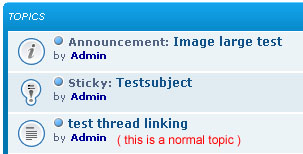 LINE:  TABLE: 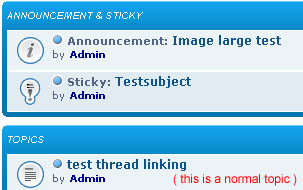 |
| This tutorial was written by Metal Knight. Updated by Sunny_D || 19.07. '08 Updated by Base - February 2, 2015 |

Caihlem- Energetic
-
 Posts : 8969
Reputation : 342
Language : English, French & Female
Location : You can't fly like the phenix

Page 1 of 1
Permissions in this forum:
You cannot reply to topics in this forum Facebook
 Twitter
 Pinterest
 Youtube
